How to focus in Apple's Camera app
Apple's Camera app sets focus and exposure automatically before each photo. To choose the focus point yourself:
- Open Camera.
- Tap the screen where you want the focus area.
- If the photo is too bright or too dark, drag up or down next to the focus area. This changes exposure, not focus.
To keep that focus and exposure for the shots that follow, touch and hold the focus area until AE/AF Lock appears. The lock holds both focus and exposure. Tap the screen to unlock.
With the Camera Control. On models with the Camera Control, you can hold the lock from the button instead. Go to Settings > Camera > Camera Control and turn on Lock Focus and Exposure; you only need to do this once. In Camera, lightly press and hold the Camera Control until AE/AF Lock appears above the frame, keep your finger on it, and click to take the photo. Releasing the Camera Control turns the lock off. The settings you can adjust by sliding on the Camera Control are Exposure, Depth, Zoom, Cameras, Styles and Tone. Focus is not on that list; the Camera Control only holds it through the lock.
Set a focus distance on iPhone 18 Pro and iPhone Duo
Apple's iPhone User Guide for iOS 27 describes a Focus tool on iPhone 18 Pro models and iPhone Duo. It lets you set focus to a specific point, and it keeps focus and exposure as separate controls, so adjusting one does not change the other.
- Open Camera.
- Tap the camera tools button, then tap Focus. You can also add the Focus control to the tools above the camera frame.
- To use a specific camera, tap Ultra Wide, Main or Telephoto. The camera you choose stays selected for your next shots.
- Drag the slider to set the focus distance. Areas that are in focus are outlined.
Tap A to return to automatic focus. The Focus tool is not available in every camera mode. To change brightness while using it, use the separate Exposure control in the camera tools.
The same models can also keep a moving subject in focus as its distance changes. Tap the subject to show a yellow frame, then double-tap the frame to start tracking. Tap Focus Tracking to stop.
Which iPhone models have which focus controls
This table follows Apple's iPhone User Guide for iOS 27 and its model lists, read on 26 October 2026. Guides for earlier iOS versions may describe different controls.
| Focus control in Apple's Camera | Models, per Apple |
|---|---|
| Tap to focus, and AE/AF Lock by touch and hold | Described in the guide without a model list |
| Lock Focus and Exposure with the Camera Control | iPhone 16, iPhone 16 Plus, iPhone 16 Pro, iPhone 16 Pro Max, iPhone 17, iPhone 17 Pro, iPhone 17 Pro Max, iPhone Air, iPhone 18 Pro, iPhone 18 Pro Max, iPhone Duo |
| Focus tool with a focus distance slider, and Focus Tracking | iPhone 18 Pro models and iPhone Duo |
| Macro photos with automatic switching to the Ultra Wide camera | iPhone 13 Pro, iPhone 13 Pro Max, iPhone 14 Pro, iPhone 14 Pro Max, iPhone 15 Pro, iPhone 15 Pro Max, iPhone 16, iPhone 16 Plus, iPhone 16 Pro, iPhone 16 Pro Max, iPhone 17, iPhone 17 Pro, iPhone 17 Pro Max, iPhone 18 Pro, iPhone 18 Pro Max, iPhone Duo |
Focusing close up with macro
On models that support macro photography, Camera uses the Ultra Wide camera for close-ups. In Photo or Video mode, get close to the subject, as close as 2 centimeters, and Camera switches to the Ultra Wide camera automatically.
- When you are within macro distance, a macro button appears on the screen. Tap it to turn automatic macro switching off, and tap it again to turn it back on.
- If the photo becomes blurry with switching off, back up, or tap .5x to switch to the Ultra Wide camera.
- To turn off the manual Macro Control, go to Settings > Camera and turn off Macro Control.
- To keep your Macro Control choice between camera sessions, go to Settings > Camera > Preserve Settings and turn on Macro Control.
The User Guide pages cited here give no minimum focus distance for each lens. Apps can read one: since iOS 15, Apple's AVFoundation framework reports a camera's minimum focus distance in millimeters, or -1 when the distance is unknown.
How camera apps set focus by hand
Apple's AVFoundation framework is how an iPhone app controls a camera device. Since iOS 8, an app can lock the lens at a chosen position with the setFocusModeLocked(lensPosition:completionHandler:) method, which Apple documents as the only way to set the lensPosition value. Before changing focus settings, the app calls lockForConfiguration() to get exclusive access to the camera's configuration.
- Lens position is not a distance. The value runs from 0.0, the shortest distance at which the lens can focus, to 1.0, the furthest. Apple notes that a position does not correspond to an exact physical distance, is not consistent from device to device, and that 1.0 does not represent focus at infinity. A focus slider built on it is relative, not a scale in meters, so check distant subjects with a focus aid instead of trusting the far end of the slider.
- Support is reported per camera. An app checks isLockingFocusWithCustomLensPositionSupported. When that is false, the app can lock focus only where the lens already is.
- Autofocus is still there. Besides the locked mode, the API offers autoFocus, which focuses once and then locks, and continuousAutoFocus, which refocuses when needed. To focus where you tap, an app sets focusPointOfInterest and then one of those autofocus modes.
Check focus with peaking and a magnifier
On a phone screen, a slightly soft subject can look sharp. When you focus by hand, two viewfinder aids help you see where focus actually falls:
- Focus peaking highlights high-contrast edges in the preview, usually with a colored overlay. As you move the focus control, the highlight moves to whatever is sharp. Turn focus until the highlight sits on the edges of your subject.
- A focus magnifier enlarges part of the preview so you can judge fine detail. Magnify your subject, adjust focus until eyelashes, text or texture look crisp, then go back to the full frame to compose.
Use peaking to find the focus plane quickly and the magnifier to confirm it. Peaking reacts to contrast in the preview image, so it can light up busy texture that is not quite sharp and stay quiet on smooth, low-contrast subjects. In dim light, or when peaking shows little, trust the magnifier. On iPhone 18 Pro models and iPhone Duo, Apple's Focus tool gives a similar cue by outlining the areas that are in focus while you drag its slider.
Manual focus in Seenlight
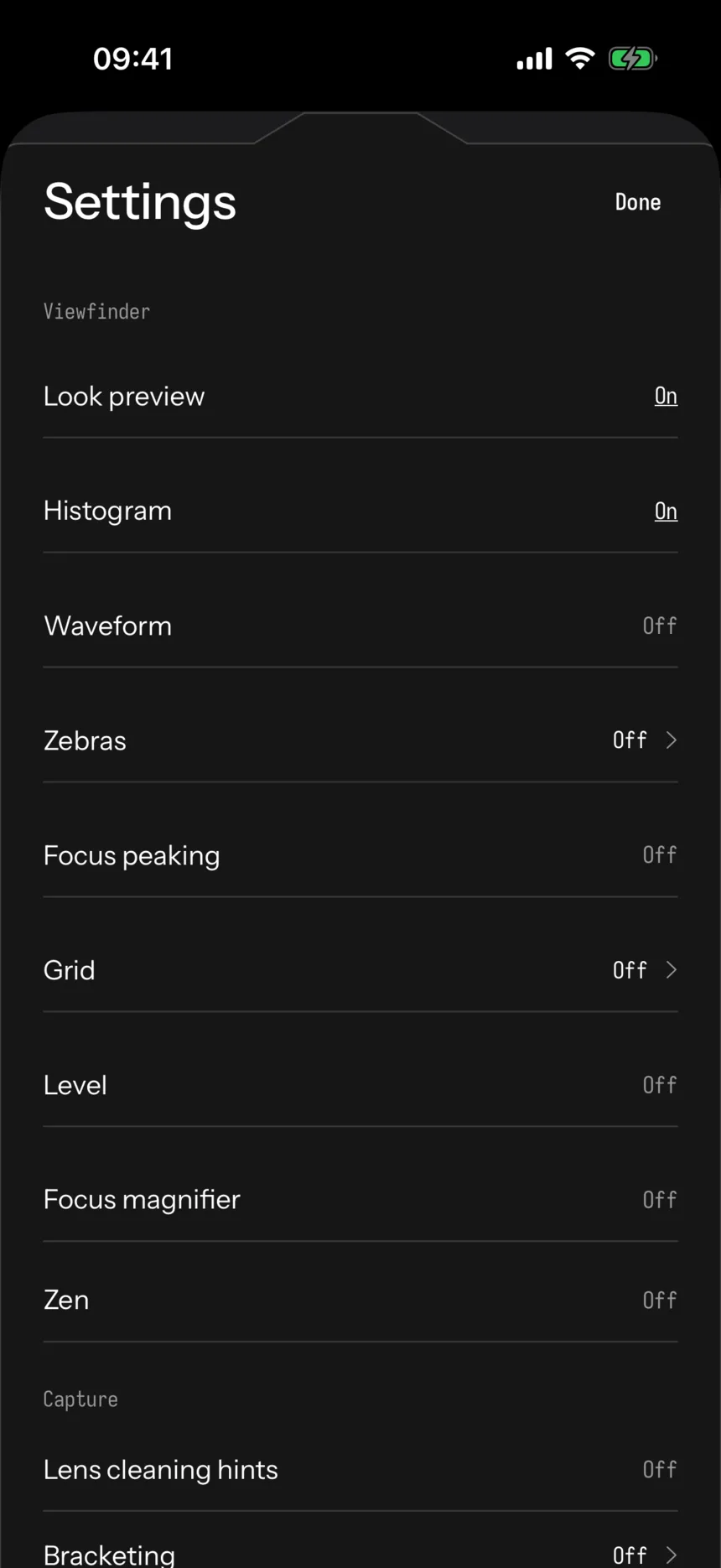
Seenlight is a manual RAW camera app for iPhone, coming soon to the App Store. Its focus control will lock the lens position with the AVFoundation method described above. On a lens that cannot lock focus at a custom position, it will show "Fixed focus".
Its viewfinder settings will include Focus peaking and Focus magnifier switches. With the magnifier on, a 4x inset shows the area you last tapped and sits clear of the focus control, so you can watch detail while you turn focus. Touching and holding the viewfinder will fill the frame with the magnified view until you let go. Every feature, including these focus tools, will be free.
Related guides: how to turn off HDR on iPhone and how to shoot RAW on iPhone. More about Seenlight is on the home page.
What this page does not claim
- That Apple's Camera app has a focus distance slider on models other than iPhone 18 Pro models and iPhone Duo; Apple's iOS 27 guide describes it only for those models.
- That an AVFoundation lens position maps to a distance in meters, matches between iPhone models, or reaches infinity at 1.0. Apple documents that it does none of these.
- A minimum focus distance for any particular iPhone lens. The only distance used here is Apple's 2 centimeters for macro on supported models.
- That every camera on every iPhone supports locking focus at a custom lens position.
- That focus peaking or a magnifier guarantees a sharp photo. Both show the live preview, not the saved file.
- That Seenlight is available today. It is coming soon to the App Store, and its features are described as planned for launch.
Questions
Can you manually focus the iPhone camera?
Yes, in part. In Apple's Camera app you tap to choose the focus point and touch and hold to lock it with AE/AF Lock. On iPhone 18 Pro models and iPhone Duo, the iOS 27 Focus tool also lets you drag a slider to set the focus distance. On other models, a manual camera app can lock the lens position through Apple's AVFoundation framework on cameras that support it.
How do I lock focus on iPhone?
Touch and hold the focus area in Camera until AE/AF Lock appears, and tap the screen to unlock. On models with the Camera Control, turn on Settings > Camera > Camera Control > Lock Focus and Exposure, then lightly press and hold the Camera Control. Releasing it turns the lock off.
Why are my close-up iPhone photos blurry?
On models that support macro, Camera switches to the Ultra Wide camera when you get close, as close as 2 centimeters. If you turned automatic macro switching off and the photo becomes blurry, back up or tap .5x to switch to the Ultra Wide camera.
Does the iPhone Camera app have focus peaking?
Apple's iPhone User Guide does not describe a feature called focus peaking. On iPhone 18 Pro models and iPhone Duo, the Focus tool outlines the areas that are in focus while you set the focus distance.
Sources
- Use iPhone camera tools to set up your shot (iPhone User Guide, iOS 27), accessed 2026-10-26
- Use the Camera Control on iPhone (iPhone User Guide, iOS 27), accessed 2026-10-26
- Models with the Camera Control (iPhone User Guide, iOS 27), accessed 2026-10-26
- Take macro photos and videos with your iPhone camera (iPhone User Guide, iOS 27), accessed 2026-10-26
- Models that support macro photography (iPhone User Guide, iOS 27), accessed 2026-10-26
- setFocusModeLocked(lensPosition:completionHandler:), AVCaptureDevice, accessed 2026-10-26
- lensPosition, AVCaptureDevice, accessed 2026-10-26
- isLockingFocusWithCustomLensPositionSupported, AVCaptureDevice, accessed 2026-10-26
- minimumFocusDistance, AVCaptureDevice, accessed 2026-10-26
- AVCaptureDevice.FocusMode, accessed 2026-10-26
- focusPointOfInterest, AVCaptureDevice, accessed 2026-10-26
- lockForConfiguration(), AVCaptureDevice, accessed 2026-10-26